In Release First, Ship Faster, we explored why releasing early and often reduces risk, improves communication, and leads to better products. This post covers the how — a practical framework for implementing Release First in your team.
Start Simple
Release First does not require a massive tooling overhaul. Start where you are and build incrementally.
Use Git
Non-programmers (and even some programmers) generally balk at using Git, but Git and the associated hosting platforms provide powerful tools for managing files:
- organization (team/repo/directories)
- documentation (excellent support for Markdown)
- efficient navigation (links in READMEs and other markdown files)
- history (who changed what when)
- collaboration (issues, pull requests)
- distributed (anyone can work anywhere)
- automation (continuous integration (CI), continuous deployment (CD), hooks, etc.)
- reviews (PRs)
- workflow (enforces workflow such as requiring PRs, approvals, etc.)
- versions (feature and maintenance branches)
- releases (built in way to do formal releases)
- security (granular access controls and workflow permissions, bank level security for web access (https), and better for Git operations (ssh keys))
Git is not primarily a way to manage projects, but rather a way to manage and collaborate around files, with some project management thrown in. It is centered around the work, which is the main point.
Other tools have more advanced project management features, which are needed at times. But they are missing a key ingredient: tight integration with your files. The closer you can keep your project management and other metadata to the actual work, the better.
Start with Information
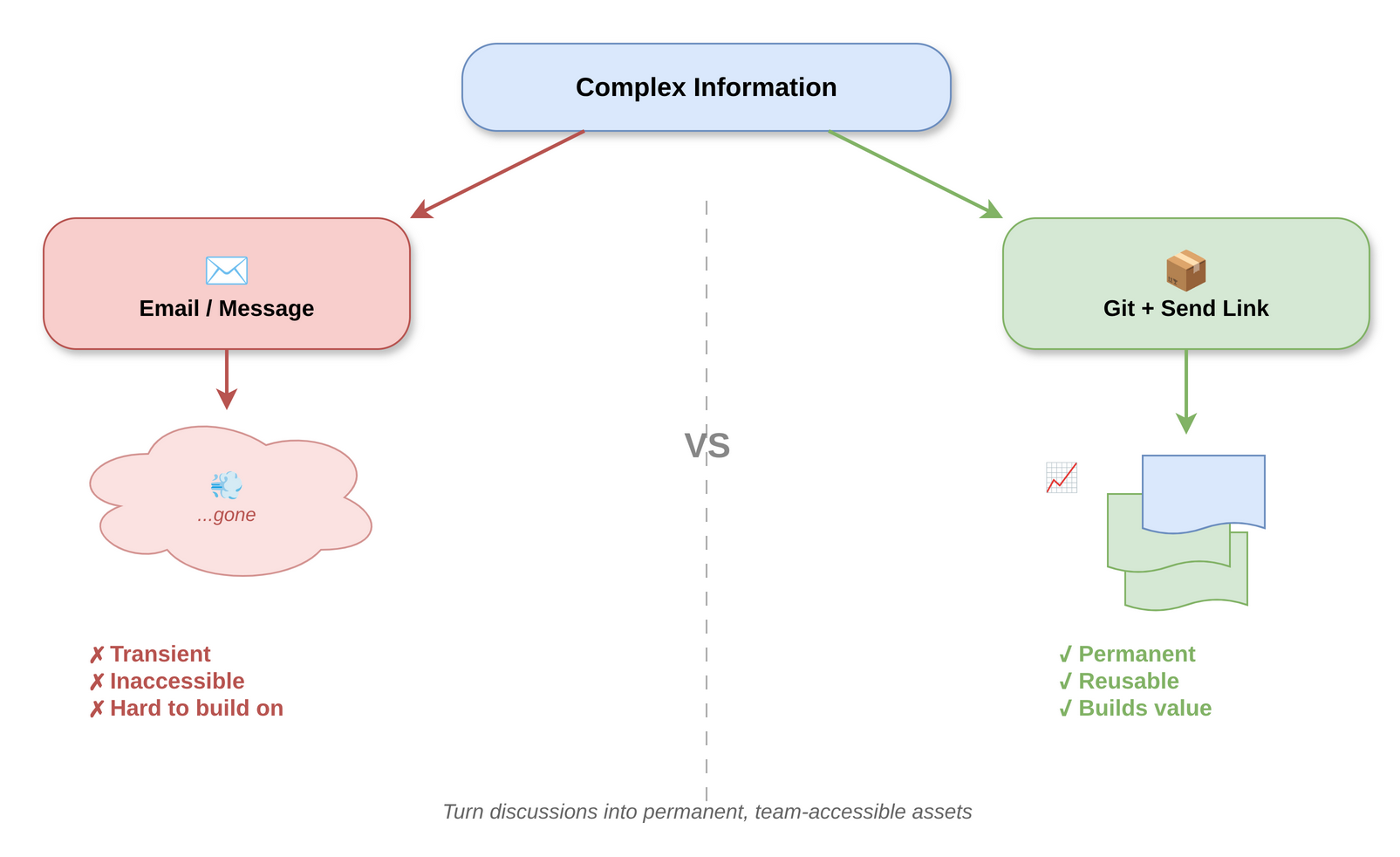
The Release First mindset starts with how you handle reasonably complex information (a procedure, technical details, etc). There are two approaches:
- Email or message the information.
- Put it in Git and send a link or PR.
The first is transient, inaccessible, and difficult to build on or improve.
The second is permanent, reusable, accessible, and something people can build on. It is an asset.
Sure, there are times when email or messaging is the appropriate forum for discussions. But the minute there is something of value, turn that into a permanent, team-accessible asset. This is how teams build value.
What Do We Release?
Everything! Even something as trivial as a prototype cable assembly can be "released." Is there a part number for the assembly, a bill of materials (BOM), and a clear drawing that is versioned? Is this assembly added to a higher-level BOM? Is everything stored in the proper place and under version control? Are changes over time being clearly documented? This takes a little more work up front, but there are multiple benefits:
- Easy to order parts with complete BOMs.
- The prototype build can be easily outsourced.
- Less likely to make mistakes.
- The documentation is being tested for clarity and accuracy BEFORE we get to production.
- It is easy to do it again.
What is Not a Release?
The following are not a release:
- Emails
- Messages
- Meetings
- Memos
- Experiments
- Prototypes (that are not released)
Why? Because this information is not permanent. While others consume it and find it very useful, it is transitory and cannot be continually used, refined, and improved over time. It is one-off communication.
The Bare Minimum Release
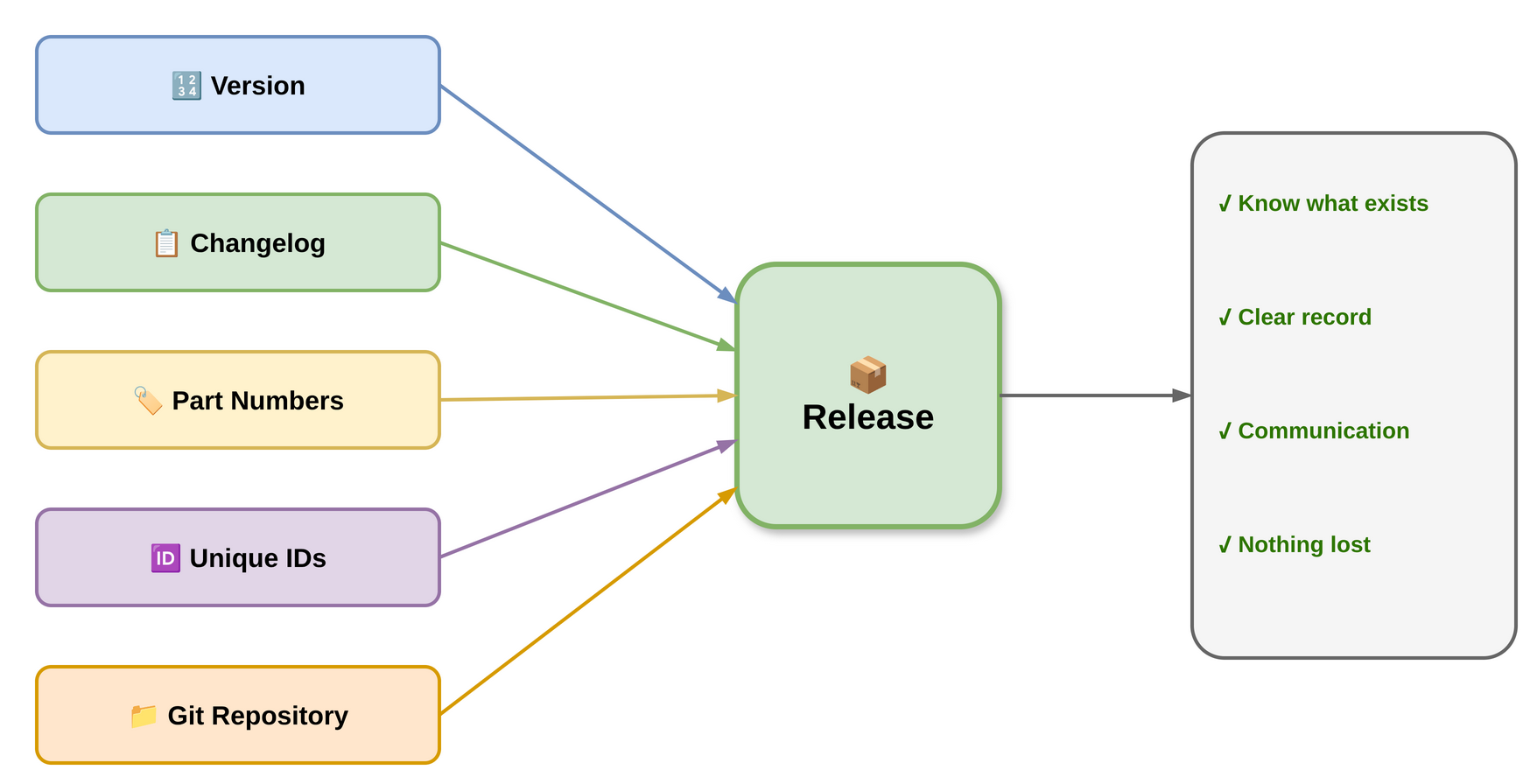
What is the bare minimum to call something a release? Consider the following:
- A version that increments with every release.
- A changelog that describes what has changed for every version and why it matters.
- A clear identification of any assets (IPNs).
- Unique IDs for anything built (HFIDs).
- A place to store stuff where all this gets tracked over time (Git).
The concrete benefits:
- Exact knowledge of what exists.
- Clear record of who did what when.
- Clear communication to everyone involved.
- Nothing gets lost.
Doing the above for all design assets (including documentation) from day one in the development process improves thinking, communication, and effectiveness — and reduces untold confusion and wasted time.
This does not need to be hard. Simple text files, spreadsheets, and CSV files work great. It is perfectly fine to start small.
Keep a Changelog
A changelog is a file which contains a curated, chronologically ordered list of notable changes for each version of a project. It is written with the users in mind so that they know what is new in each release that might be interesting to them (as a user). Developer details do not belong in the changelog — keep those in Git comments.
See this site for more information.
The Simple Approach to Versioning
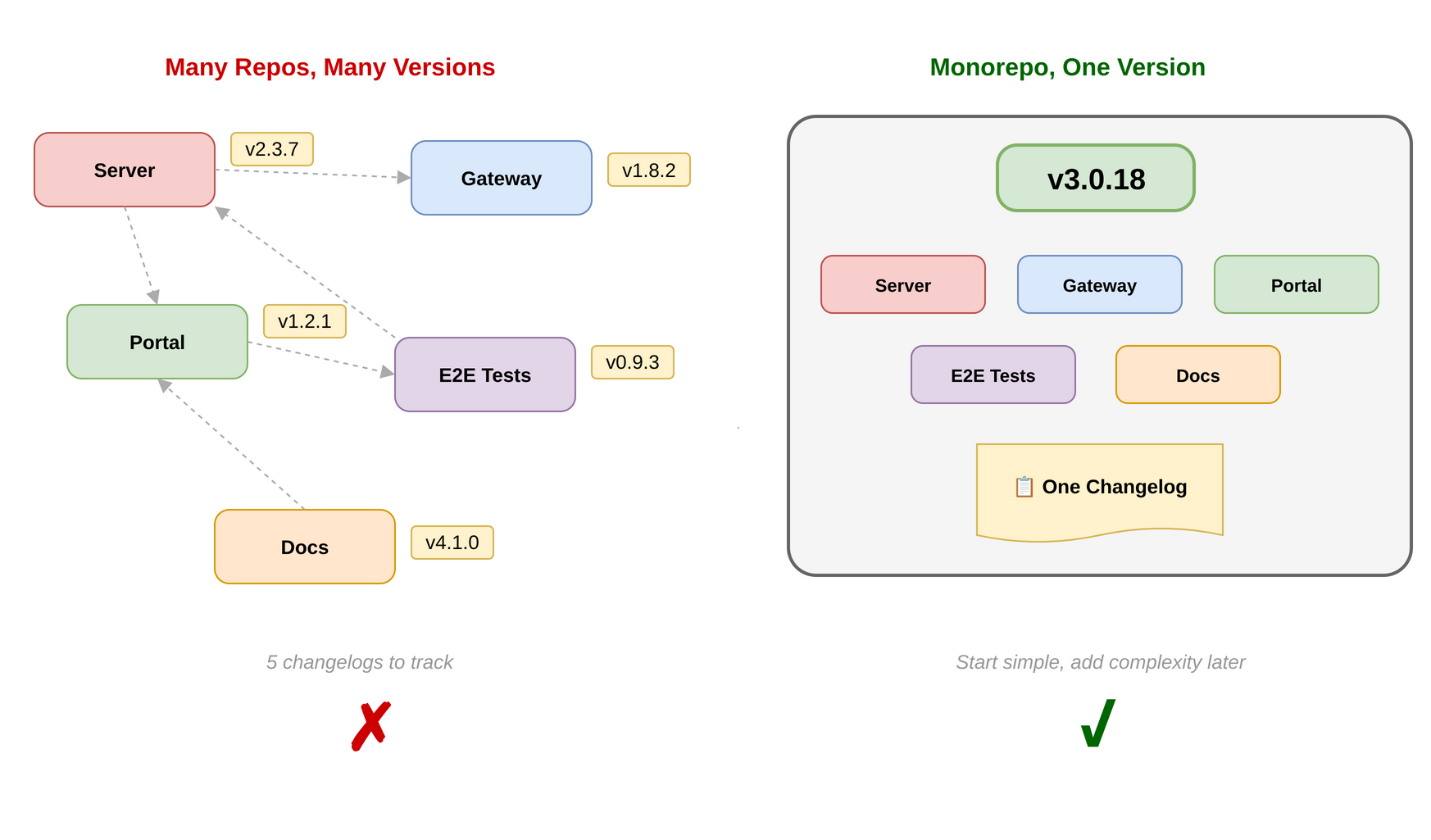
The natural tendency is to think that all software components need their own version, which can be a daunting task to implement, track, and manage. However, until a team is large enough to have multiple groups dedicated to different tasks, instead put everything in a monorepo and use a single version for everything. Not every component needs to be released with every version, only the ones that have changed. There are several advantages:
- There is a single changelog to review.
- It is easy to coordinate things — components of the same version should work well together.
- Much easier to use AI to execute tasks that involve multiple components. If there are several repos, you are always fighting security checks when crossing repos (at least in Claude Code).
- It is easy and simple.
"But!!!," you say, "The versions won't always be sequential, some will be skipped for various components!!!" Why does this matter? If it bothers you, release every component for every version. Automation can easily do this.
The resulting changelog looks something like this:
2026-03-06 v3.0.18

[Server]

- Fix mongo iterator stopping on decode errors instead of skipping bad documents
  Add bson truncate tags to all int fields to handle float64 values from
  JavaScript

[GW]

- Improve response of Modbus polling.

[Portal]

- Add UI for e2e test status.

2026-03-06 v3.0.17

[Server]

- Log rule count each processing cycle to aid debugging

2026-03-06 v3.0.16

[E2E testing]

- Improved ntfy error messages to include response body for easier debugging.
- Reduced log noise: only log pump and cycle mirror state changes instead of
  continuous tank level.
- Added logging of test status on initial check and state changes.
Start simple, and add complexity when there is a need.
Building Your Release Process
The Checklist — The Simplest Release Process
If you do something repetitively that involves multiple steps, create a checklist. This has the following benefits:
- Clarifies the process
- Makes the process repeatable with less effort
- Allows other people to execute the process
- Is the basis for automation
Automate Checklists with Scripts
If you have a checklist, turn the parts of it you can automate into a script. Most of my projects have an envsetup.sh file with a number of functions. (See this article for more information). These functions do two things — reduce time to do common operations, and (just as importantly) document how to do something. Additionally, AI is really good at writing scripts — the barrier to entry is very low.
From Scripts to GitHub Actions
A script can be easily turned into a GitHub Action (or similar on other Git hosting platforms), which can do things like:
- Run tests on every commit
- Build releases when the repository is tagged
- Deploy releases
- Run printed circuit board (PCB) ERC/DRC checks
- Build PCB manufacturing packages
- Automatically run interference checks between PCB and Mechanical models
- Update documentation
Again, AI agents are very good at generating automation like GitHub Actions.
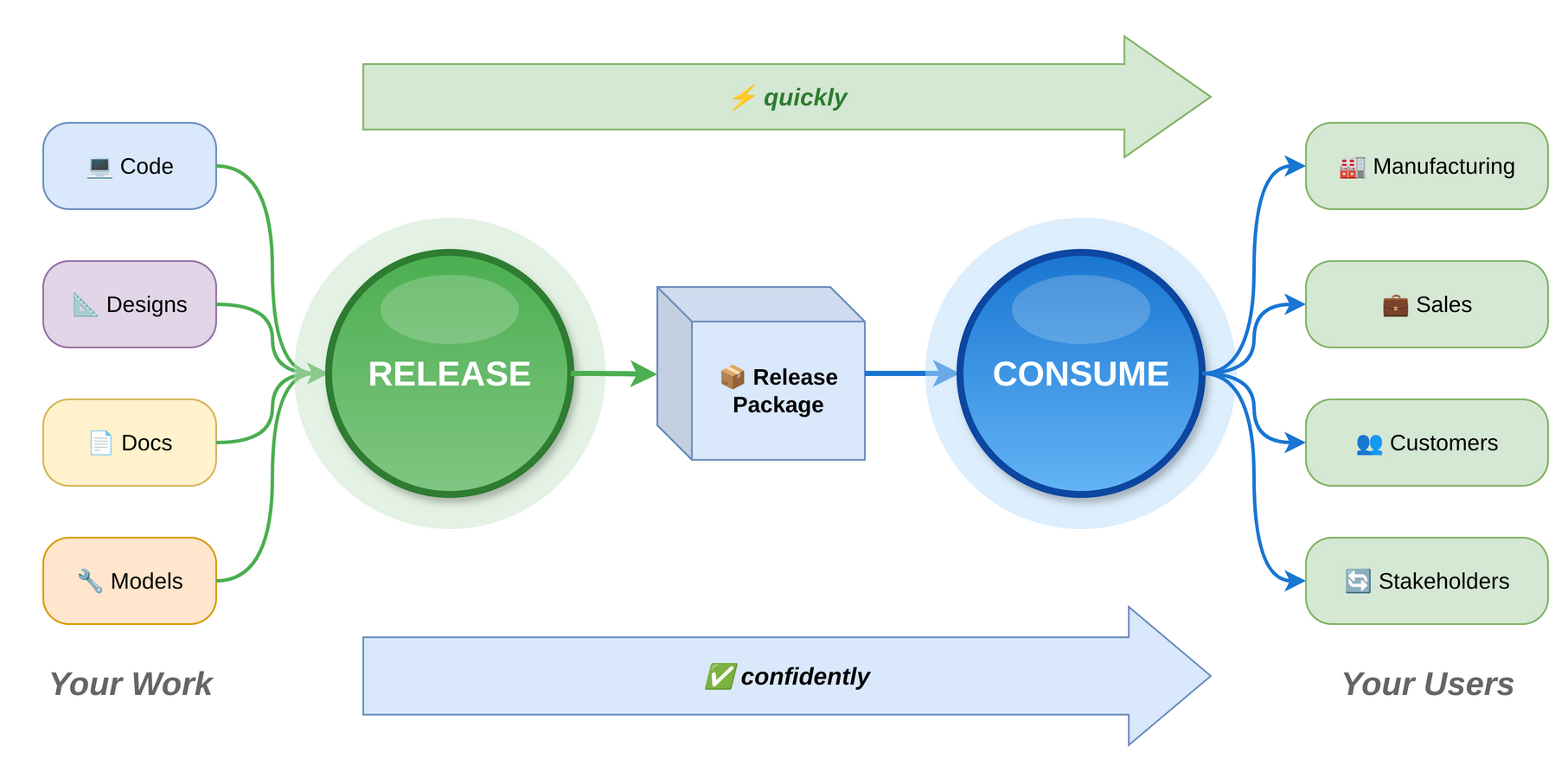
The Big Green Button and the Big Blue Button
The Big Green Button — Making Releases Easy
Think of the release mechanism as a Big Green Button — a single step that converts designs/code/models/documentation into something others (manufacturing, sales, customers, stakeholders, etc.) can use. This can include:
- Scripts
- GitHub actions
- PCB release automation
- Mechanical assets generation (drawings, models, etc).
- Documentation generation
- Automated testing (unit and end-to-end)
- Simulations
This is the critical point — do you have a "Big Green Button"? Without one, releases naturally get delayed until the last minute, losing opportunities for critical early feedback.
The Big Blue Button — Making Releases Usable
On the other side of the release, we need a Big Blue Button — a way to make the release easy to use. There are several aspects:
- Communicating to users that a release is available and relevant to them.
- Making it easy to consume the release.
- An efficient way to support and get feedback from users.
The Big Blue Button includes:
- Clear documentation, tutorials, videos.
- Well organized assets that are consistent from release to release.
- An easy way to obtain/install/update the release.
- Built-in help functionality, diagnostics, automated error reporting.
- A community where the user feels included, supported, and part of something bigger than themselves.
It is critical that both Buttons exist. We may have the most efficient release process ever, but without a way to ensure releases are easily used, we'll lose many of the benefits of releasing.
Advanced Practices
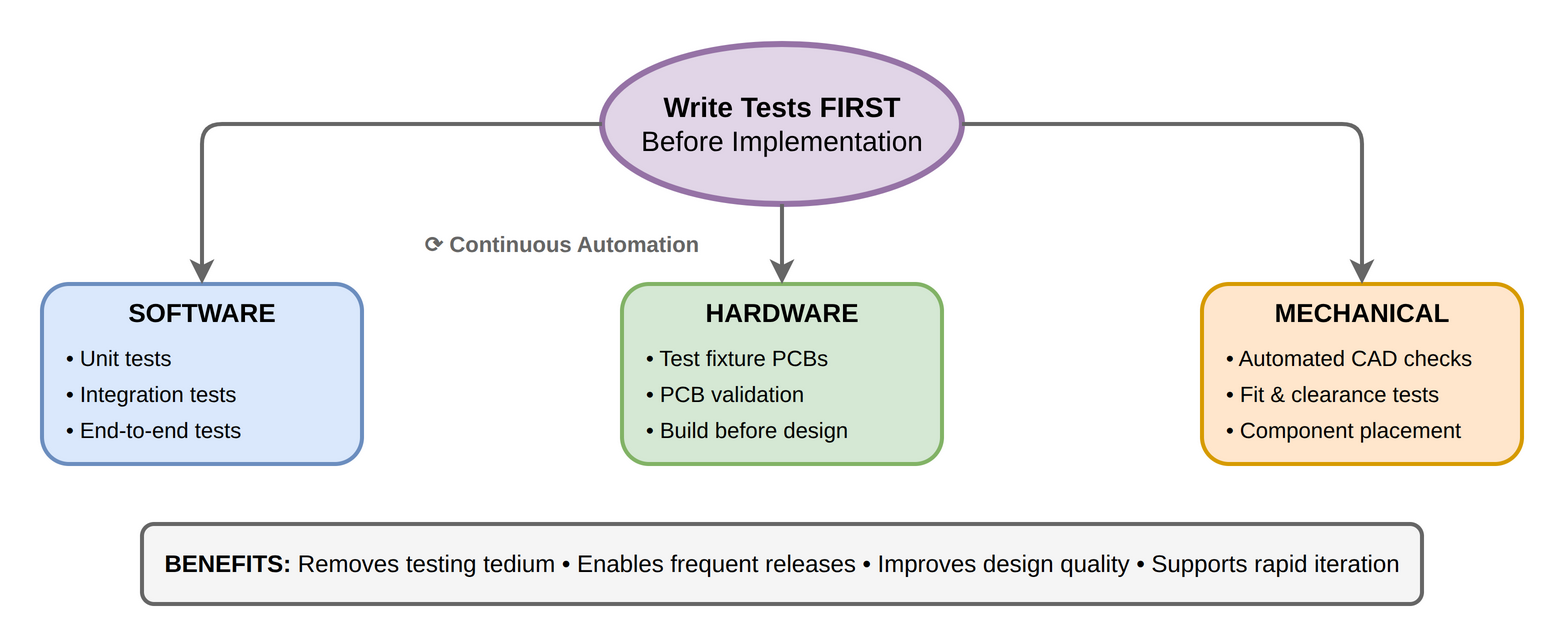
TDPD — Test Driven Product Development
We're familiar with TDD (test-driven development) in the software world. What if we extend this to systems, hardware, and even mechanical?
- Write end-to-end system tests before developing a feature.
- Design/build test fixtures before designing the PCB. PCBs are cheap and fast to build now — so build an additional one for testing.
- Create automated checks on 3D CAD models for fit/clearance, etc. Does the new PCB fit in the product?
And then automate all these so they run continually. This takes the tedium out of testing and helps ensure every development change is a release. Testing first also leads to better design.
RDPD — Release Driven Product Development
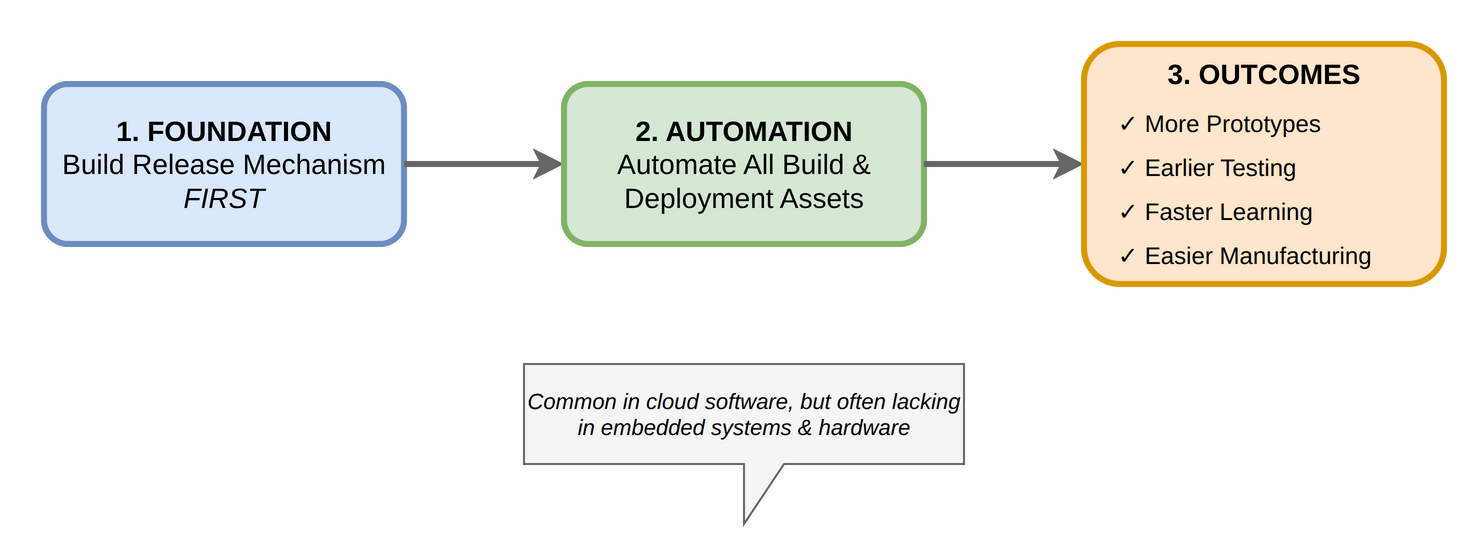
Similar to TDPD, Release-driven product development (RDPD) is another perspective.
- Build the release/deployment mechanism before implementing the design.
- Automate as much of the release as possible.
- This includes all assets needed to build/deploy the product.
While this idea is somewhat common in cloud software (continuous delivery), embedded, hardware, and mechanical release mechanisms are usually lacking.
The benefits:
- More prototypes will be built (because it is easy).
- More testing will occur early (because prototypes are available).
- Lots will be learned (happens when people are using prototypes).
- Releasing to manufacturing becomes easy (because it has already been done many times).
Implementing release mechanisms first is a strategic approach, because without doing it first, it likely won't get done. Once something is "finished," there is pressure to move on to the next development.
DDPD — Document Driven Product Development
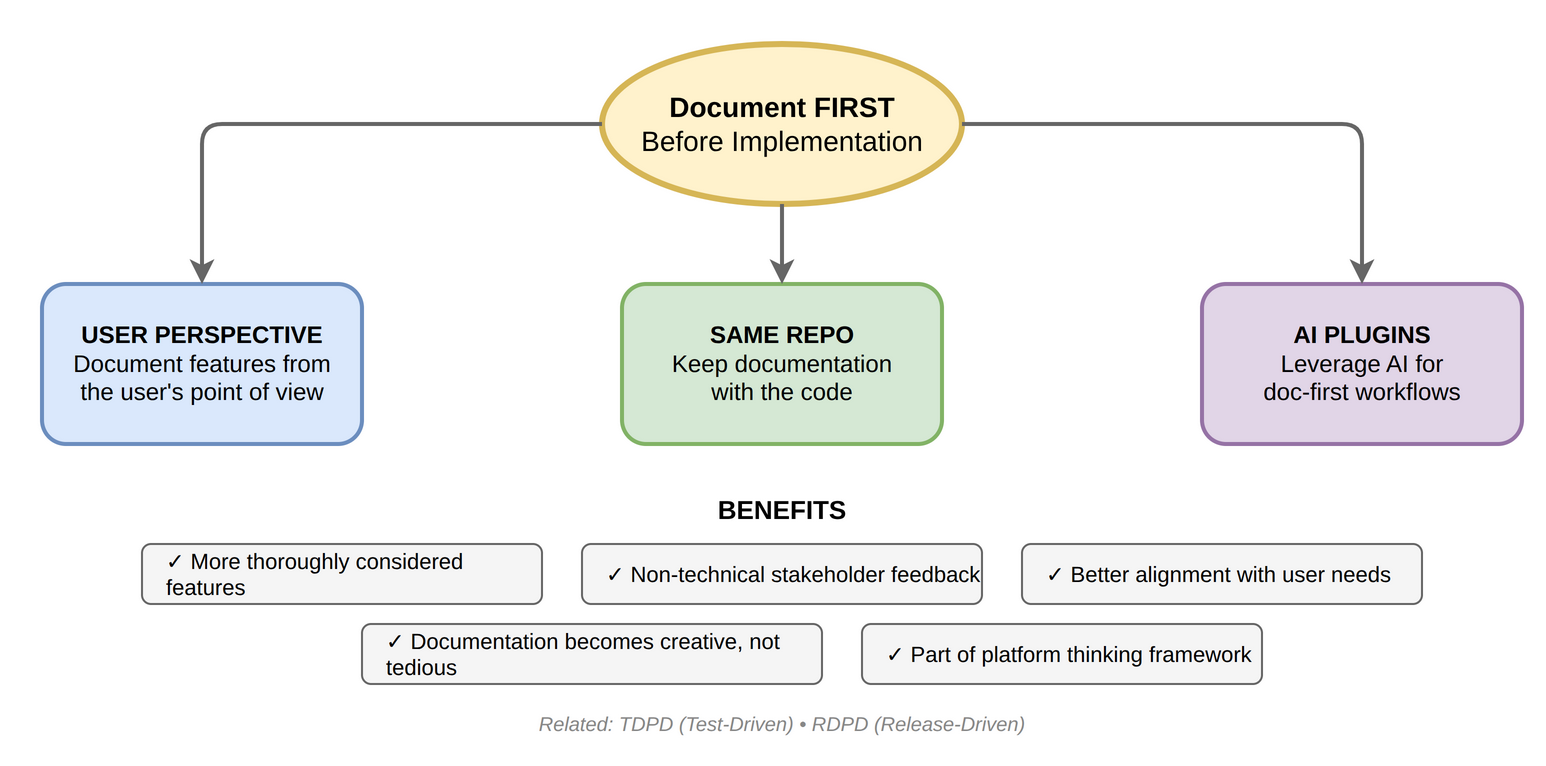
Building on TDPD and RDPD, Document-driven product development (DDPD) offers another perspective.
Ideas:
- Document the feature from the user's perspective before implementing anything.
- Keep the documentation close to the code (same repo, etc.).
- Use a doc-driven AI plugin when applicable.
Benefits:
- Better thought-through features.
- Non-technical people can review before implementation.
- Higher likelihood of implementing what users actually need.
- Documentation becomes a pleasant/creative/thinking task, rather than a boring requirement after implementation.
CDPD — Container Driven Product Development
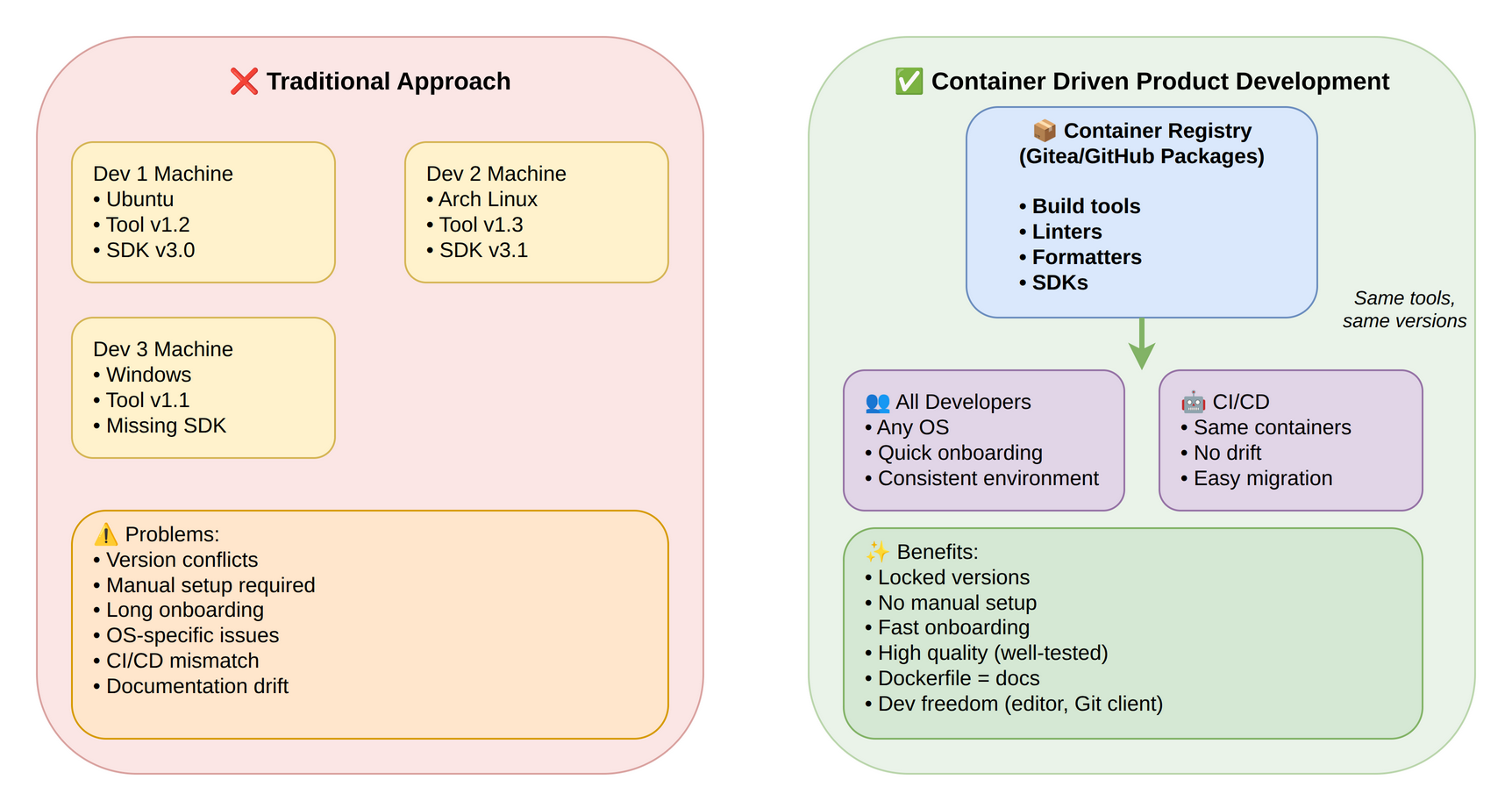
Any shared tools used by the team (build, linting, formatting, CI/CD) etc. should be put in containers up front (before development starts) and used for development builds as well as CI/CD.
Why?
- It is pretty easy these days with Claude Code.
- Gitea, GitHub, and likely other Git hosting platforms now provide convenient "package" registries. You no longer need to go through the hassle of using the Docker registry.
- It is easy to onboard new devs — no need to spend time installing SDKs and a host of tools.
- Versions are locked down, eliminating the possibility of different people using different versions.
- They get exercised a lot, so quality is high.
- It is much easier to move into CI/CD.
- A Dockerfile is easier to maintain than a long document describing how to manually install all the tools needed.
- NPM and Python packages are a pain to install locally, so why not just eliminate that pain?
- It is easier to get everyone on the team using the entire toolset (linting, formatting, etc.).
- No longer fighting differences between developers' machines. If one developer wants to run Arch and another Ubuntu, no problem.
Developers are still free to use their favorite editor, Git client, and other local tools.
Implement the Software Update Mechanism First
For any connected device, implement the software update mechanism first. Installing software updates should be quick and easy early in the development cycle by anyone. Connecting a PC running developer software to the device does not count.
This has the following benefits:
- An easy way to update systems encourages us to do it more often, because it is easy.
- We iterate faster.
- Fixes and improvements are deployed instantly.
- We test more systems during development.
- We can easily adapt as we learn more about the problem we are trying to solve.
- We can involve more non-technical people in development and testing.
- What helps us scale in production also helps us scale during development.
What Do We Mean by "First"?
Several things:
- First in the timeline of development.
- First thing we focus on during implementation.
- First priority.
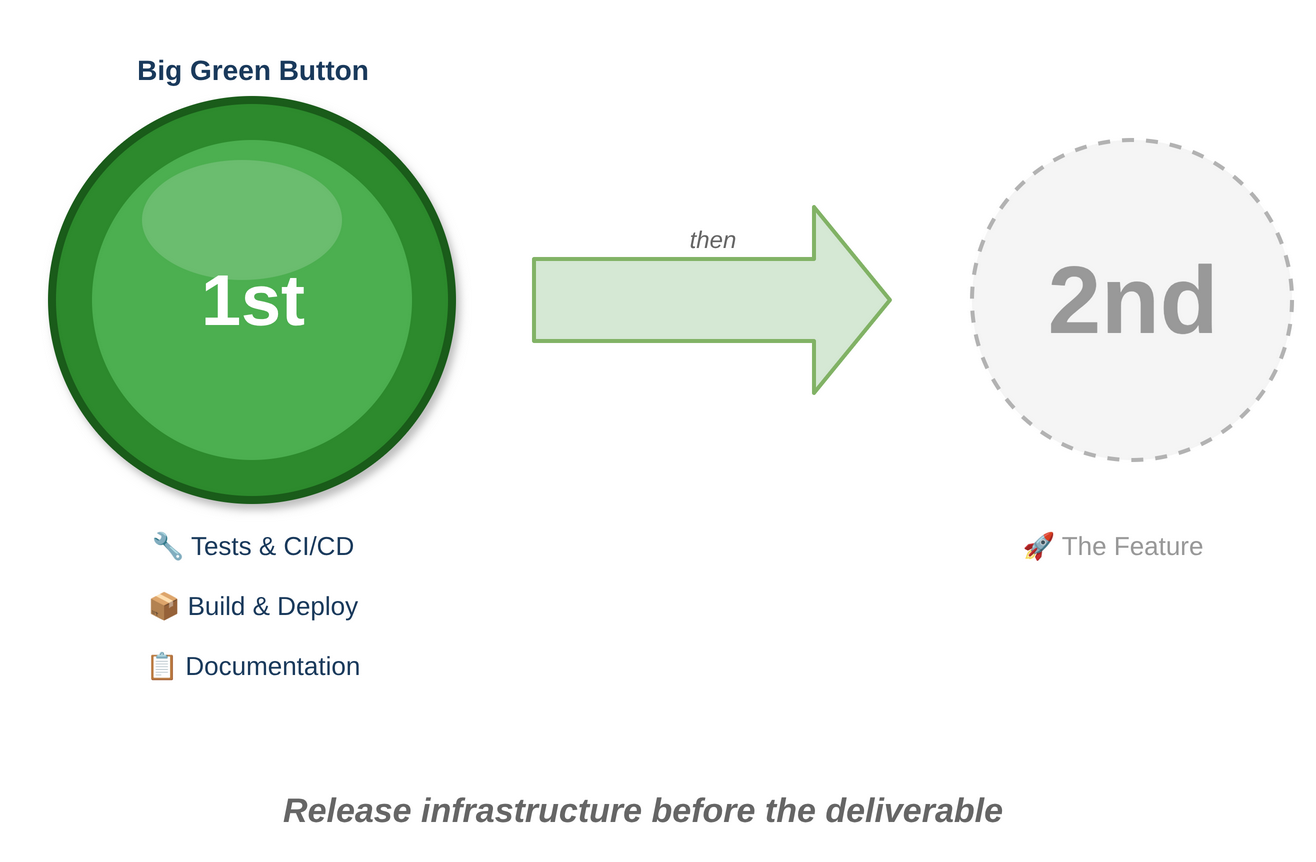
Simply put, implement the Big Green Button before implementing the actual deliverable. This might include:
- Tests
- CI/CD
- Build automation
- Deployment scripts
- PCB release automation
- Clear user documentation
- etc.
This becomes part of the review process, part of the culture, part of the expectation, and part of the daily habit — make it easy to release.
Because the Big Green Button does not ship to customers, forgetting and neglecting this step comes naturally. Release First is a simple hack to ensure it gets done before the rush to do other things.
Each Release is 100% DONE
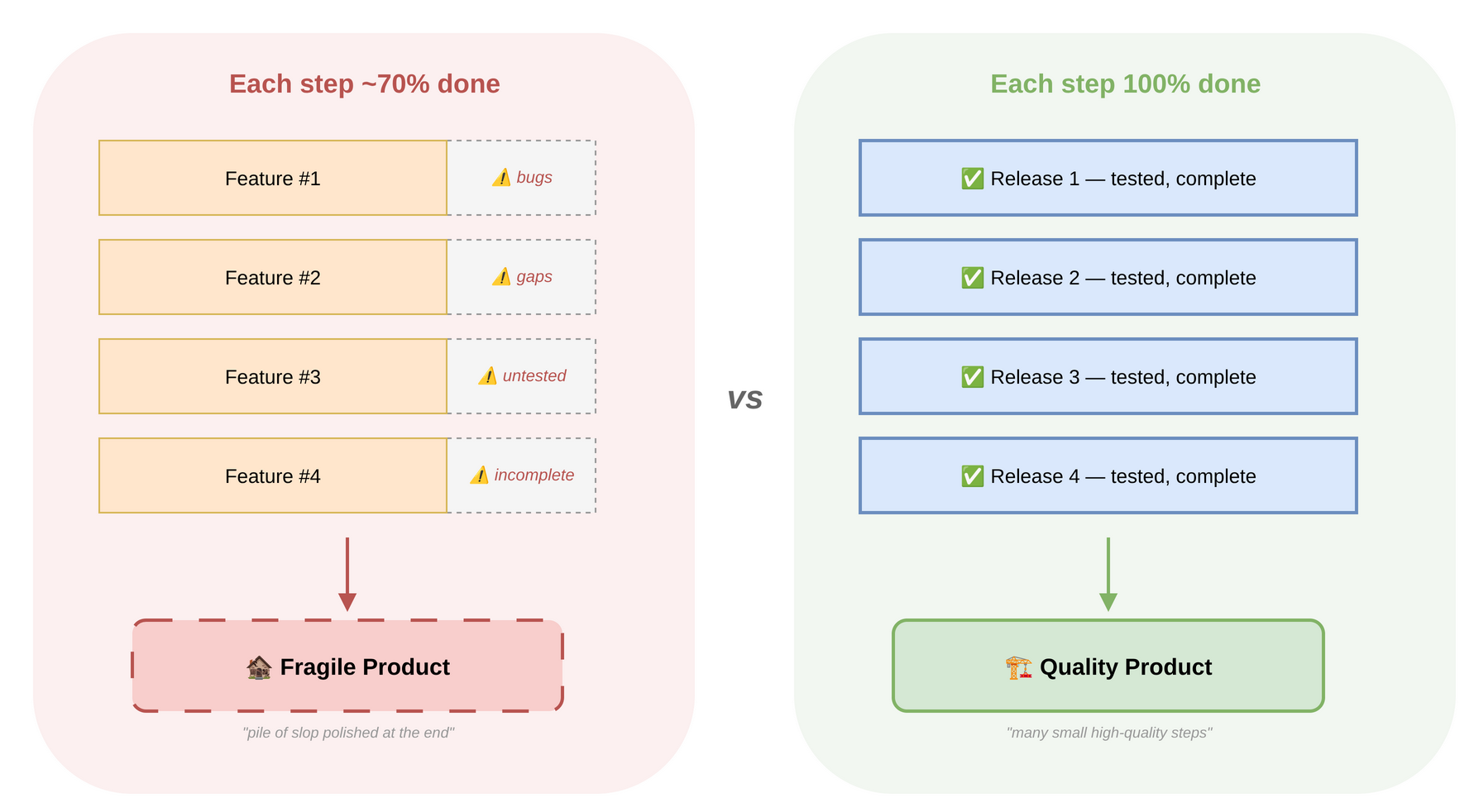
One common problem in product development is developers not finishing a feature or task. They get it to 70% done and rush off to the next thing. Bugs linger, edge cases go unhandled, testing falls short, and the release process remains incomplete. "100% done" does not mean the product is 100% done — it means each release is complete, tested, and high quality. Quality products emerge from many small high-quality steps, not from a pile of slop that somehow gets polished by QA at the end of the development cycle.
Release First is a simple way to ensure each step in the journey is 100% done and high quality.
The Role of AI
AI is good at a lot of things, but it is really good at implementing automation (scripts, GitHub actions, Ansible scripts, etc.) The key is to use a local agent such as Claude Code, OpenAI Codex, Gemini Code, OpenCode, etc. Prompting in a web UI will not get you there — you must have a local agent.
The availability of AI removes pretty much every excuse for not releasing first. It can do the tedious time-consuming things we did not have time for before.
AI also adds additional risks in that we can't audit or manually review everything it generates. Thus, Release First provides additional guardrails and checks to ensure what we are generating with AI is quality.
Success Stories
The Planter System Simulator
Some years ago, I worked on a very successful project that instrumented and controlled agricultural planters. It was a ground up project with a number of difficult subsystems developed by a distributed team that communicated with each other. This is the perfect recipe for an integration nightmare where things blow up at the last minute. However, the project ran fairly smoothly, and we delivered working systems on schedule. Every planting season was a hard deadline, so there was not much give in the schedule. Some of the reasons this project succeeded:
- We used source control systems for the entire project (SVN and then Git)
- We had a custom (both hardware and software) built simulator for the entire planter system that fit on a developers desk. We could run end-to-end simulations of the entire system.
- We built software-update mechanisms into the entire system early in the development cycle. As a result, we were continually running new software together.
- Software was versioned from the start. We knew what we were running.
There are obviously other factors such as a talented team and good architecture. But the above are things that stand out as being different from other projects I've worked on.
The BRun Utility
BRun is a program that provides a simple way to run native workflows without containers, and includes a number of useful built-in units such as Git, Cron, Email Ntfy.sh, Log, Count, etc. The project has a number of release features:
- Automated tests run on every commit (GitHub actions).
- Uses GoReleaser to build release packages for all platforms.
- Releases are automatically built when the repo is tagged.
- The ChangeLog is extracted automatically for every release.
As a result, there is almost no friction to releasing a new version of BRun. I'm confident it works, and it takes almost no time.